For marketing teams in 2026, AI tools have moved from nice-to-have to essential. Producing visuals, short-form videos, ads, and social media posts at scale is now part of the day-to-day workflow, and AI sits at the center of it. Brands are competing on speed, consistency, and creativity, and the right tools make all three possible.
Whether you’re managing social accounts, running paid campaigns, or building a brand presence, the right AI tools can speed up production, lower costs, and improve engagement. Here are 10 AI tools marketing teams are using in 2026.
An ig text post generator helps users create engaging, creative, and professional Instagram captions quickly for better audience interaction.
How we chose these tools
We evaluated each tool based on five criteria relevant to marketing teams: ease of use (how fast can a non-designer produce content), output quality (is it polished enough to publish), pricing and free tier availability, commercial licensing (can you legally use the output in ads and campaigns), and collaboration features (does it support team workflows). The tools below cover image generation, video creation, and all-in-one suites, because most marketing teams need more than one type of content.
| Tool | Type | Best for | Starting price | Free tier | Commercial license |
| Midjourney | Image | Artistic and conceptual visuals | $10/month | No | Yes (paid plans) |
| Canva Magic Media | Image + Design | Quick social media graphics | $12.99/month (Pro) | Yes (limited) | Yes (Pro plan) |
| Freepik AI Suite | Image + Video + Editing | All-in-one visual content | $5.75/month | Yes (limited) | Yes (all paid plans) |
| HeyGen | Video (AI avatars) | Talking-head social videos | $24/month (Creator) | Yes (limited) | Yes (paid plans) |
| OpenAI Image Generation | Image | Realistic, prompt-accurate visuals | $20/month (ChatGPT Plus) | Yes (limited) | Yes |
| Adobe Firefly | Image | Brand-safe commercial visuals | $54.99/month (All Apps) | Yes (limited) | Yes (trained on licensed content) |
| Runway | Image + Video | Campaign videos + AI visuals | $12/month (Standard) | Yes (limited) | Yes (paid plans) |
| Stable Diffusion | Image | Custom AI pipelines (technical) | Free (open source) | Yes (full) | Varies by model |
| Leonardo AI | Image | Stylized marketing visuals | $12/month (Apprentice) | Yes (limited) | Yes (paid plans) |
| Image Creator in Copilot | Image | Quick brainstorming and concept previews | Free | Yes (full) | Limited |
1. Freepik AI Suite (Best for All-in-One Visual Content)

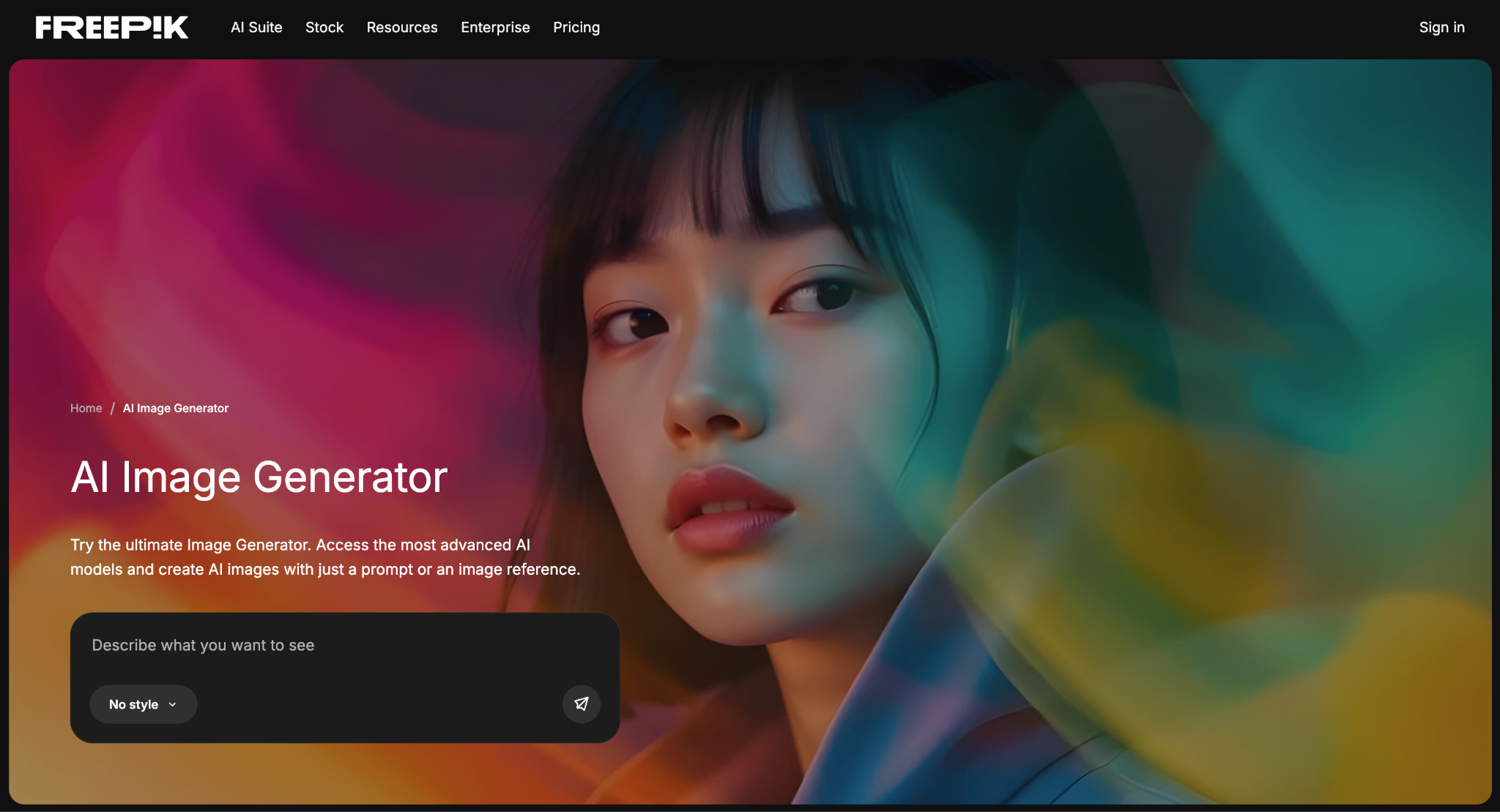
Freepik has grown into a full AI image generator and creative suite. It bundles image generation, video creation, editing tools, and a stock library of 200M+ assets in one place, which is practical for marketing teams that don’t want to juggle multiple subscriptions.
The AI Image Generator includes models like Google Imagen, Seedream, and Nano Banana, each suited to different output styles, from photorealistic product shots to illustrated social media graphics. Custom Characters let you train the AI on a specific face or figure and reuse it across campaigns, which helps maintain visual consistency without reshooting. There’s also a Video Generator with models from Google Veo, Kling, and MiniMax, plus editing tools like Background Remover and an Image Upscaler.
Freepik AI also includes Spaces, a collaborative canvas where teams can work together on visual projects in real time.
Pricing: Essential plan starts at $5.75/month (84,000 credits/year). Premium+ at $24.50/month includes unlimited generations on 30+ models. Free users get limited access to test the tools.
Pros
- Multiple AI models to choose from (image and video) in one platform
- Custom Characters for consistent visuals across campaigns
- 200M+ stock photos, vectors, and templates included with paid plans
- Spaces for team collaboration on shared projects
Cons
- Little profound customization in comparison with sophisticated AI tools
- Some premium models (Imagen 4 Ultra, Veo 3) require higher-tier plans
- Learning curve for advanced features like Custom Characters and LoRA training
2. HeyGen (Best for AI Avatar Videos)

HeyGen focuses on AI avatar videos, talking-head content where a synthetic presenter delivers a script. It’s built for marketing teams that need explainer videos, product walkthroughs, or social media clips without hiring on-camera talent.
For teams producing Reels, Shorts, TikToks, or ad videos on a regular schedule, HeyGen cuts production time significantly, you write a script, pick an avatar, and get a finished clip in minutes. The avatars look professional enough for LinkedIn and YouTube content, though they still have a noticeable “AI feel” that may not work for every brand.
Pros
- Professional AI avatars with natural voiceovers
- Ideal for short-form social video (Reels, Shorts, TikToks)
- No camera, studio, or talent needed
Cons
- AI avatars lack the emotional range of real presenters
- Advanced customization (custom avatars, longer videos) requires more expensive plans
- Not suitable for visually complex video content like product demos or lifestyle footage
3. Lenso.ai (Best for AI-Powered Visual Search & Content Research

Lenso.ai is an AI-powered visual search platform that helps social media creators and marketing teams find similar images, discover visual content, and research images across the web. Instead of relying on keywords, users can upload an image and let AI find visually related results, making it useful when searching for content inspiration or exploring a particular visual topic.
For social media creators, Lenso.ai can make the research stage of content creation much faster. You can use an existing image to discover similar visuals, find original image sources, identify duplicate content, or explore related images that can inspire new posts and campaigns. Its image search capabilities are particularly useful when you know what you want visually but don’t know the right keywords to describe it.
Lenso.ai also includes filters and sorting options that help users narrow down search results by factors such as domain, language, image size, and date. This makes it easier for marketers and creators to find more relevant visuals instead of manually browsing through hundreds of search results.
Pricing: Free searches are available with limited usage. Paid plans provide higher search limits and additional capabilities for more extensive image research.
Pros
- AI-powered search finds visually similar and related images
- Useful for social media content inspiration and visual research
- Can help identify duplicate images and original sources
- Advanced filters make it easier to refine image search results
- Simple image-upload workflow without needing the right keywords
Cons
- Primarily focused on visual search rather than generating complete social media content
- Some advanced search capabilities require a paid plan
- Results can vary depending on the quality and uniqueness of the uploaded image
4. Midjourney (Best for Artistic and Conceptual Visuals)

Midjourney is known for producing highly stylized, artistic images. Marketing teams use it for conceptual campaigns, mood boards, and visuals where a distinctive aesthetic matters more than photorealism. It’s a go-to for designers, creative directors, and branding teams that want visuals with strong artistic identity.
The tool runs through Discord, which can feel unintuitive at first compared to browser-based generators. But the output quality for illustration-style and editorial imagery is consistently high, especially for social campaigns that need to stand out visually on feeds like Instagram and Pinterest.
Pros
- High artistic quality and distinctive visual style
- Strong community with shared prompts and techniques
- Ideal for mood boards, editorial visuals, and brand campaigns
Cons
- Runs through Discord, not a standalone app, steep learning curve
- Less effective for photorealistic product images or ads
- No built-in editing or design tools; output needs post-processing elsewhere
5.Design.com (Best for AI-Generated Social Media Visuals)
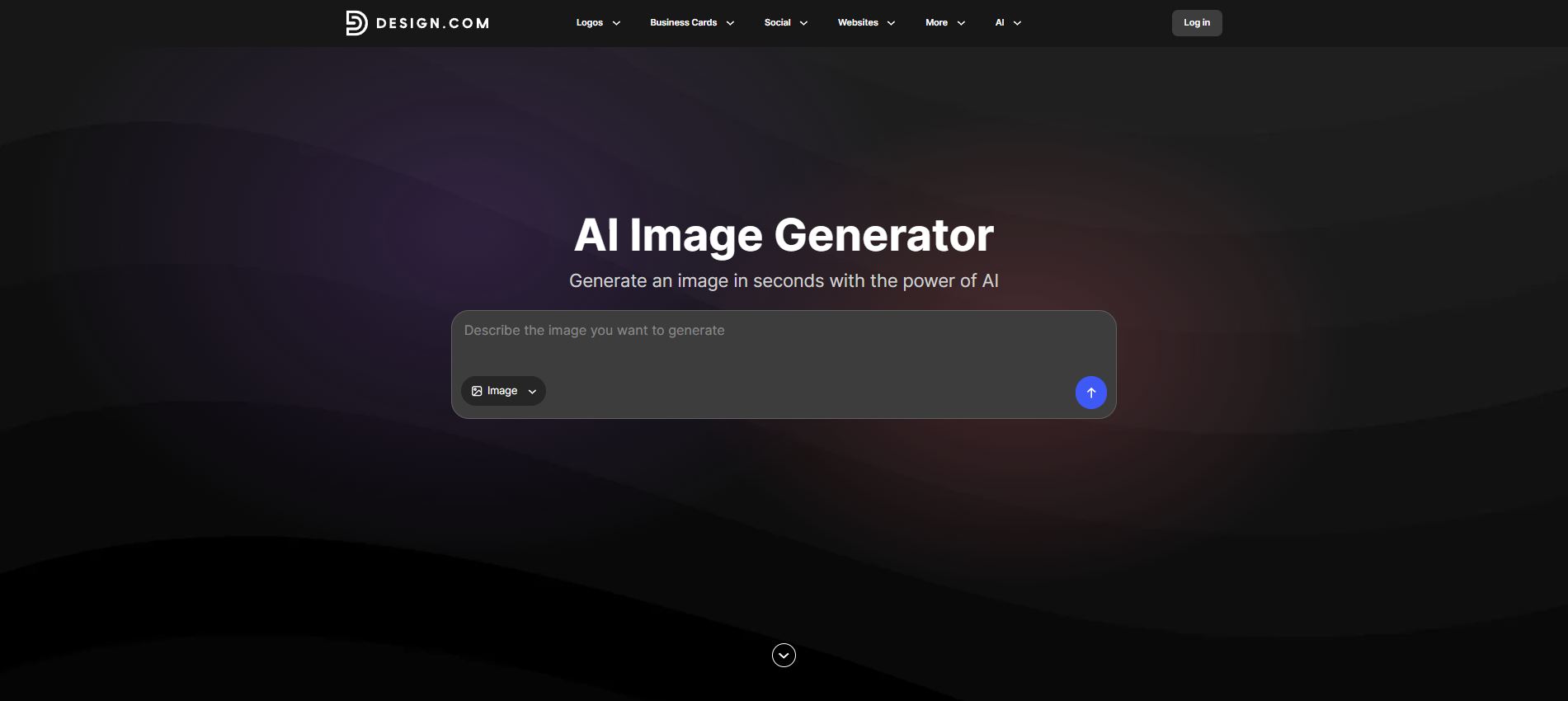
Design.com’s AI Image Generator lets you create custom visuals for social media by simply describing what you want. You can specify the subject, setting, style, mood, colors, and composition using everyday language, then generate multiple versions to choose from.
It works well for businesses and creators that need fresh visuals for Instagram posts, Facebook content, ads, website graphics, and other marketing materials. If the first result is not quite right, you can adjust the prompt and generate another version without starting over.
Design.com also connects image generation with its broader design tools, so you can use your visuals in social media templates, flyers, presentations, websites, and other branded content. You can also add your logo, brand colors, and fonts to keep your content consistent.
6. Templated (Best for Automated Social Media Content at Scale)
Templated is built for teams that need to generate social media content in bulk, not just design one post at a time. Instead of manually editing templates like in tools such as Canva, Templated allows you to automate the entire process using APIs or no-code workflows.
You can create a single template for posts (Instagram, LinkedIn, ads, etc.) and generate hundreds or thousands of variations by simply changing the input data – making it ideal for marketing teams, agencies, and SaaS products.
The biggest advantage is how it fits into workflows. Templated integrates with tools like Google Sheets, Zapier, and Make, allowing teams to generate content automatically without repetitive design work.
Key Features:
- Template-based image, PDF, and video generation
- API-driven automation for bulk content creation
- No-code workflows using spreadsheets and automation tools
- Supports dynamic data (text, images, branding elements)
- Consistent design output across all posts
Pros:
- Massive time savings for repetitive content
- Perfect for scaling social media campaigns
- Works for both developers and non-technical teams
- High consistency in branding
Cons:
- Not ideal for one-off creative designs
- Requires initial template setup
Pricing: Free tier available with usage-based plans for scaling teams
7. OpenAI Image Generation (Best for Realistic and Prompt-Accurate Visuals)
OpenAI’s image generation, now integrated into GPT-4o and available via the gpt-image-1 API, produces detailed and realistic visuals from natural language prompts. It handles ads, product mockups, blog graphics, and social posts well, and its conversational interface makes iterating on results fast, you describe what you want, see the output, and refine through follow-up prompts.
For marketing teams already using ChatGPT for copywriting or brainstorming, adding image generation to the same workflow is convenient. The quality is strong for realistic and commercial-style images, though it’s less suited for highly artistic or stylized outputs.
Pricing: Available through ChatGPT Plus ($20/month) with usage limits. API access via gpt-image-1 is usage-based.
Pros
- High realism and strong prompt accuracy
- Conversational interface makes iteration easy
- Integrated into ChatGPT, convenient if you already use it for copy
Cons
- Less artistic range than Midjourney or Flux-based generators
- Limited fine-tuning or style control
- Usage limits on ChatGPT Plus; heavy use requires API access
8. Adobe Firefly (Best for Brand-Safe Commercial Visuals)
Adobe Firefly is Adobe’s AI image generator, built into Creative Cloud apps like Photoshop and Illustrator. It’s aimed at teams already using Adobe for print, branding, or large-scale commercial projects, and its outputs are trained on licensed content, which makes them safer for commercial use.
Firefly offers strong control over styling, lighting, and composition. If your team already works in Photoshop, generating and editing AI images happens inside the same tool. The downside is cost, you need a Creative Cloud subscription, and Firefly alone doesn’t justify that price if you’re not using the broader Adobe suite.
Pricing: Included with Adobe Creative Cloud ($54.99/month for All Apps). A standalone Firefly plan is also available with limited credits.
Pros
- Commercial-safe AI outputs (trained on licensed content)
- Deep integration with Photoshop, Illustrator, and Express
- Precise control over styling, lighting, and composition
Cons
- Requires a Creative Cloud subscription ($54.99/month for All Apps)
- Best results come from using Firefly within Photoshop or Illustrator, which adds a learning curve
- Fewer model choices compared to multi-model platforms
9. Canva Magic Media (Best for Quick Social Media Graphics)
Canva’s built-in AI image generator (Magic Media) is designed for speed. It sits inside the same drag-and-drop editor used for social posts, presentations, and ads, so you can generate an image and drop it into a design without switching tools. That makes it a natural fit for social media managers and small marketing teams that publish frequently.
The real advantage is Canva’s template ecosystem. You generate an image, place it into a pre-sized Instagram Story or LinkedIn post template, add text and branding, and export, all in one workflow. For teams without a dedicated designer, this end-to-end process saves significant time.
However, if you’re looking for more advanced customization or AI-driven workflows, exploring a canva alternative can help you find tools better suited to your specific content creation needs.
Pricing: Free plan available. Canva Pro at $12.99/month includes more AI generations and brand kit features.
Pros
- Extremely easy to use with no design experience needed
- AI generation + templates + export in a single tool
- Pre-sized formats for every major social platform
Cons
- Limited creative depth outputs tend to look generic
- Fewer model options compared to dedicated AI image generators
- AI features are basic compared to specialized tools like Midjourney or Freepik
10. Stable Diffusion (Best for Custom AI Pipelines)
Stable Diffusion is an open-source image generation model that runs locally or on custom servers. Marketing teams with in-house developers use it to build custom AI pipelines, for example, automating product image variations or integrating generation into internal tools.
The trade-off is clear: total flexibility and no per-image cost, but significant technical setup required. This isn’t a tool for social media managers, it’s for teams with engineering resources that want full control over their image generation stack.
Pricing: Free and open source. Infrastructure costs vary depending on hosting.
Pros
- Highly customizable with full model access
- No per-image cost (open source)
- Strong developer community with thousands of fine-tuned models
Cons
- Requires technical setup (Python, GPU infrastructure)
- No user-friendly interface out of the box
- No built-in commercial license, usage rights depend on the specific model version
11. Leonardo AI (Best for Stylized Marketing Visuals)
Leonardo AI sits between artistic generation and practical design work. It’s popular for concept art and stylized marketing visuals, and its model fine-tuning feature lets teams train on specific visual styles for brand-consistent outputs.
The platform offers a range of style presets and enough creative control to produce visuals that look distinct without requiring the technical skills Stable Diffusion demands. It’s a good middle ground for teams that want more artistic control than Canva but less complexity than open-source tools.
Pros
- Diverse style presets with flexible creative control
- Model fine-tuning for brand-specific visual styles
- More approachable than open-source alternatives
Cons
- Limited free tier (daily token cap)
- Smaller ecosystem and fewer integrations than Adobe or Canva
- Less effective for photorealistic or product-focused images
12. Runway (Best for Campaign Videos and AI Visuals)
Runway combines image and video generation in one platform. Its Gen-4 model handles text-to-video and image-to-video, which makes it useful for teams producing campaign videos alongside static visuals. The web-based editor supports real-time collaboration, so multiple team members can work on the same project.
For marketing teams that need both video and image generation without switching between tools, Runway covers both. The video output quality is competitive for social-length clips (5–15 seconds), though longer or more complex videos still require traditional editing.
Pricing: Free tier available. Standard plan starts at $12/month.
Pros
- Image and video AI generation in one platform
- Web-based editor with real-time collaboration
- Strong for short-form video content (Reels, ads, teasers)
Cons
- Advanced video features (Gen-4 Turbo, higher resolutions) are expensive
- Overkill for teams that only need image generation
- Video output works for social clips but lacks polish for long-form content
12. Image Creator in Microsoft Copilot (Best for Quick Concept Previews)
Microsoft’s Image Creator, available free through Copilot, is a quick way to visualize ideas during early brainstorming. It’s useful for rapid concept previews and initial campaign exploration, though the results aren’t typically polished enough for final assets.
For marketing teams that just need a fast sketch of an idea before investing time in a more capable tool, it does the job at zero cost. It’s also accessible to anyone with a Microsoft account, which makes it easy to share with stakeholders during planning sessions.
Pricing: Free with a Microsoft account.
Pros
- Completely free and easy to access
- Fast generation for quick concept visualization
- No account setup beyond existing Microsoft login
Cons
- Limited control over style, composition, and output quality
- Not suitable as final marketing assets
- Fewer customization options than any paid alternative
How to Choose the Right AI Tool for Your Team
The right tool depends on what your team produces most and how much technical skill you have in-house.
If you need one platform for everything (images, video, editing, stock assets): Freepik AI Suite covers the widest range of content types in a single subscription, including a stock library and team collaboration through Spaces.
If you publish social content daily and need speed above all else: Canva Magic Media lets you generate, design, and export without leaving the editor. It’s the fastest path from idea to published post.
If your brand identity relies on a distinctive visual style: Midjourney produces the most visually striking outputs. Pair it with a design tool for final formatting.
If you need talking-head videos without a production crew: HeyGen handles AI avatar videos for Reels, Shorts, and TikToks with minimal effort.
If your team has developers and wants full control: Stable Diffusion gives you complete flexibility to build custom pipelines, but requires engineering resources.
If commercial licensing is your top concern: Adobe Firefly is trained on licensed content, and Freepik includes a commercial AI license in all paid plans. Both are safer choices for ad campaigns and client-facing work.
What About Commercial Licensing?
A note on commercial licensing: Not all AI-generated images are cleared for commercial use. Before publishing AI visuals in ads, product pages, or client deliverables, check each tool’s licensing terms. Adobe Firefly is trained entirely on licensed and public domain content. Freepik includes a commercial AI license in all paid plans. Midjourney and OpenAI grant commercial rights on paid plans. Stable Diffusion licensing varies by model version, some are restricted. Canva covers commercial use on Pro plans. Always verify before publishing at scale.
Final Thoughts
The AI tools that work for marketing teams in 2026 are the ones that balance speed, creative quality, and ease of use, without requiring a steep learning curve.
For teams that need a single platform covering image generation, video, and editing, Freepik AI Suite consolidates those workflows. Canva is the fastest option for teams that just need social graphics. HeyGen is a strong pick specifically for AI avatar videos. Midjourney and Adobe Firefly are better suited for teams that prioritize artistic control or need tight integration with existing Adobe workflows. And for teams with engineering resources, Stable Diffusion offers unmatched flexibility at no per-image cost.
AI is already part of the daily workflow for most marketing teams, the question isn’t whether to use it, but which tools fit your team’s specific needs.
Author:
Lusine Haam is a SaaS content writer who loves turning complex software ideas into content that actually makes sense to real people. She works with B2B tech brands to create clear, engaging, and SEO-friendly content that builds trust and drives results. From blog posts and landing pages to case studies and thought leadership, Lusine focuses on writing that feels human first — strategic second — and always aligned with business goals. Her goal is simple: help SaaS companies communicate their value clearly and connect with the right audience.
LinkedIn: https://www.linkedin.com/in/lusine-haam-saas-content-writer-seo-executive/