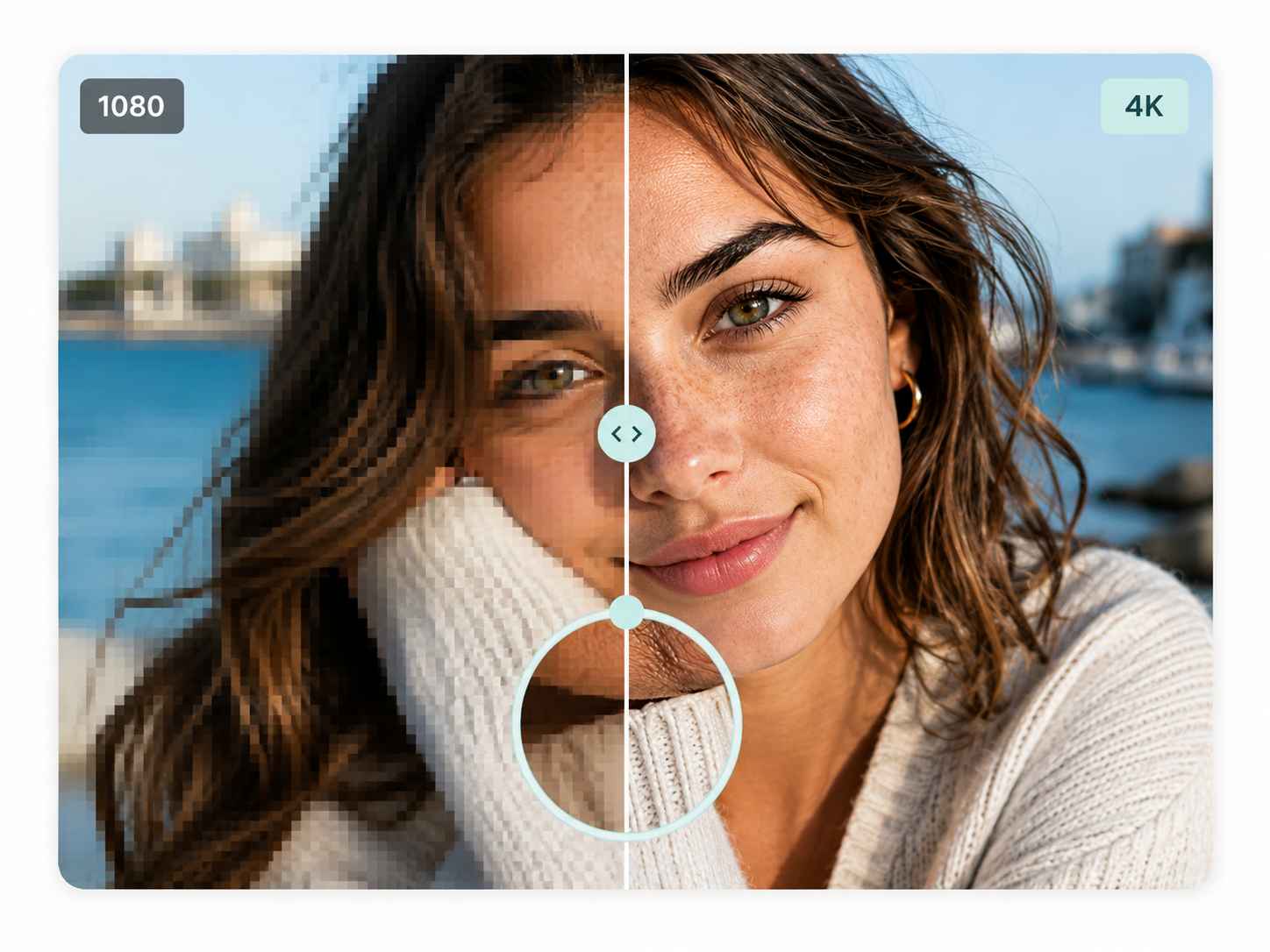
Visuals are more important than ever in digital content. Whether it’s product shots, social media graphics, website banners or personal photos, these crystal clear images make for a better first impression. But not all images are created equal, and not all of them will have the resolution that is required for today’s screens. The idea behind a 4K image upscaler is to enhance the resolution of lower-resolution or smaller images using sophisticated image processing techniques to create a sharper and more detailed image.
The working principle of a 4K image upscaler is to increase the dimensions of the image and try to maintain the critical parts of the image. The standard resizing techniques will only scale an image, and images can become soft or blurry. The modern method of upscaling is quite different from the AI-assisted method. Looks for patterns, edges, textures, etc., and works out what more of these are likely to be. This is especially helpful for images that are required to be larger than normal but not too blurry.
What Is an Image Upscaler?
Upscale an image is a software application that can be used to enhance the resolution of an image. For instance, a small image could be very detailed on a cell phone screen, but look blurry on a larger display. It can be upscaled to enhance its size and look at a larger scale.
The upscaling of recent times usually uses machine learning models trained with a vast library of images. These systems learn the typical appearance of common objects, textures, edges and patterns. The technology can be used during image processing to create a refined image based on the information learned.
The result is not necessarily the same as the original scene (higher resolution). Rather, the software renders a graphical display of the information it can obtain from the source image.
How 4K Upscaling Technology Works
The general idea is that you begin with a lower resolution image than what you want and then add the detail to it. The software analyzes the original pixels and discerns what features are important, such as outlines, faces, textures, and transitions in color.
It then creates more pixels in between or around the existing ones. More sophisticated systems utilize AI models for predicting these new pixels, not just mathematical interpolation.
The process may involve a series of steps:
– Resolution analysis: Software analyzes size and quality of the source image.
– Detail recognition: AI models recognize patterns, edges, textures and important objects.
– Pixel generation: new pixel data is added to enhance an image’s resolution.
– Noise reduction: Some tools can get rid of unwanted grain or compression artifacts.
– Sharpening: Fine details and edges can be enhanced to improve clarity.
– Optimization: Final: The final image is ready for viewing, sharing, printing, and/or further editing.
The synergy of these methods makes modern means appear to work much better than image resizing alone.
Why 4K Resolution Matters
4K is often used to describe a digital image, video or display that contains around 4,000 pixels horizontally. In the consumer segment, 3840 × 2160 pixels is known as 4K UHD.
The more resolution the more pixels that can be used to show visual information. This can make photos, drawings, depictions, product photos, etc. look sharper, especially when displayed on a large scale.
But just converting all images to 4K is not enough to produce professional images. The original image still counts. A picture that is heavily compressed or blurred will not have much information for the software to process. It can be upscaled to give it a better look, but not always a true perception of what is not captured.
Common Uses for 4K Image Upscaling
There are numerous applications of image upscaling in digital media.
– E-Commerce Photography
Product images are crucial for online stores. Often, customers will focus on materials, finishes, colors and small design details. High resolution images can be used to have a better look at the photo when the original is too small.
– Social Media Content
Photographs are often used multiple times by creators on various platforms and screen sizes. A picture that may look good in one sized image may not look good when cut or scaled down. New uses can be enabled through upscaling of older images.
– Printing
Digital images may need to be enlarged before printing. If a smaller image is used in a larger print layout, higher resolution may help minimize the amount of visible pixelation.
– Old Photographs
Older digital images may have poor resolution, as may family photographs. New upscaling technology can enhance their clarity and make them easier to project on today’s screens.
– Website Graphics
Images are likely to be needed in multiple sizes for websites, such as for banners, thumbnails, product pages and responsive designs. If the original asset in question is too small, an upscaler can do the job to make the image larger.
AI Upscaling vs. Traditional Resizing
The traditional method of resizing is based on an interpolation method. These methods use mainly the color of neighbouring pixels to calculate the color of the new pixels. They are quick and convenient but might give a less sharp appearance if the image is enlarged a lot.
AI upscaling is based on trained models that can interpret visual patterns. It does not just compute new pixels from adjacent ones, but it tries to deduce what the pixels mean.
For instance, in the case of a portrait, the AI might identify facial features and create more refined outlines in the area of the eyes, hair, or facial lines. It can emphasize straight lines and geometric designs in the processing of architectural images.
The contrast is particularly significant when viewing an image at a large enlargement.
Selecting the Proper Upscaling Tool
There are a number of things to take into account when choosing an image upscaler. While output resolution is key, it shouldn’t be the only factor.
It is important for users to determine if the tool can accommodate the most common file formats like JPG, PNG or WebP. When processing a lot of images, speed can be a factor too. There are tools available that can be used for batch processing and others specifically for individual photos.
Also, see if the program offers extra options to sharpen, reduce noise, enhance face features, or remove artifacts. Occasional users may prefer a simpler interface than that of professional designers, who may have more specific needs for controls.
Attention should also be paid to privacy. Users should know how the files are processed, stored and handled when they upload the images to an online service.
Maximizing Upscaler Performance
The result is greatly influenced by the quality of the original image. A less damaged image will likely create a more realistic larger image than a highly broken one.
Users can remove unnecessary crops, exposure and reduce excessive noise before upscaling. The right size of the enlargement is also crucial. When you zoom in on a small image, it can sometimes produce unnatural textures or edges.
The processed image should be viewed at full size and normal viewing size. A photo that appears to look great when viewed close up, can be over-processed when displayed on a larger scale.
The Future of Image Enhancement
AI image enhancement is still progressing at a fast pace. In the future, tools will be able to distinguish between real visual structures and noise compression artifacts. The advances of computer vision could also enable software to deal with more complicated scenes, faces, text and fine textures with greater accuracy.
This technology is applicable to content creators, businesses, photographers, and users, making older or low-resolution images more useful. Up-scaling is not a substitute for a good photo but is an extra bit in the digital imaging process.
Final Thoughts
When an image must be displayed larger, but does not require the same level of quality a 4K image upscaler can be useful. AI-driven technology now has the capability to understand patterns and create more visual information than just stretching pixels.
When done properly, image upscaling can be helpful for ecommerce, social media, printing, website design, photography and any other project. Ideally, you will get the finest source you can, then pick a sensible enlargement ratio, and then compare the final image to the source image. With the continuous development of image processing technology, upscaling will be an increasingly important aspect of digital content creation in the future.