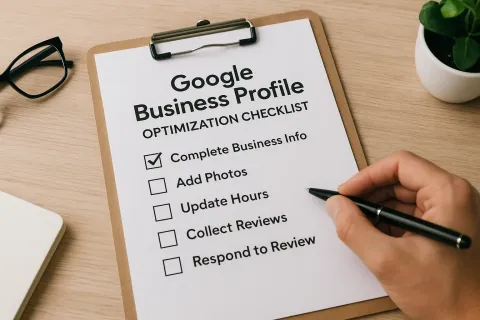
A Google Business Profile (GBP) is one of the most powerful free tools available to local businesses. When optimized correctly, it helps customers find your business, builds trust, and drives more foot traffic and online conversions. This checklist walks you through every key area you need to review and improve.
Categories and Services Check
Choosing the right categories is one of the most important steps in optimizing your Google Business Profile. Categories tell Google what your business does, and they directly influence which searches trigger your listing to appear.
Primary Category
Your primary category should describe your core business as precisely as possible. For example, if you run a pizza restaurant, your primary category should be “Pizza Restaurant,” not just “Restaurant.” The more specific you are, the better Google can match your profile to relevant searches.
Secondary Categories
Secondary categories support your primary one. A pizza restaurant might also add “Italian Restaurant” or “Food Delivery Service” as secondary categories. Do not add categories that do not relate to your business. Irrelevant categories can confuse both Google and potential customers.
Services List
Google allows you to list specific services under each category. Use this section fully. If you own a hair salon, list services like haircuts, coloring, highlights, and blowouts individually. Each service entry adds more information for Google to index, which increases your chances of appearing in specific searches.
Products
If your business sells physical products, add them to the Products section. Include product names, descriptions, prices, and photos. This section appears directly on your profile and gives customers a quick preview of what you offer before they even visit your website.
Attributes
Attributes are small details that make a big difference. Google offers attributes like “wheelchair accessible,” “free Wi-Fi,” “women-owned,” and “outdoor seating.” Select every attribute that applies to your business. Customers often filter search results using these attributes, so missing ones means missing potential customers.
Why This Section Matters
Businesses with accurate and complete category and service information rank higher in local search results. A study by BrightLocal found that businesses in the correct primary category are 5 times more likely to be considered reputable by users. Getting this section right sets the foundation for everything else.
Description, Completeness, and Photo Relevance Check
Your business description and visual content shape how customers perceive your brand before they contact you or visit your location.
Business Description
Google allows up to 750 characters for your business description. Use this space to explain what your business does, who it serves, and what makes it different. Write in plain, direct language. Avoid vague phrases. Instead of saying “we provide excellent service,” say “we repair smartphones and tablets with same-day service.”
Include relevant keywords naturally. If you run a plumbing company in Austin, phrases like “Austin plumber,” “emergency pipe repair,” and “water heater installation” belong in your description. Do not keyword-stuff. Write for the reader first, and let the keywords follow naturally. A well-written description also supports maps ranking optimization, as it gives Google clear signals about your business and location.
Business Name
Your business name on Google must match your real-world business name. Do not add keywords to your business name unless they are part of your legal name. For example, “Smith Plumbing” is correct. “Smith Plumbing Best Austin Plumber” is a violation of Google’s guidelines and can result in suspension.
Address and Service Area
If customers visit your location, enter your full address. If you travel to customers, set a service area instead. You can set both if applicable. Make sure the address is consistent across all online platforms. Inconsistent address information across directories can hurt your local search rankings.
Phone Number and Website
Use a local phone number whenever possible. Local numbers build more trust with nearby customers than toll-free numbers. Your website link should go to a relevant, working page. If you have a location-specific landing page, link to that rather than your homepage.
Business Hours
Set your regular hours and update them for holidays and special events. Customers check hours before visiting. If your hours are wrong, customers may arrive when you are closed and leave a negative review. Google also allows you to set “More Hours” for specific services, such as a restaurant listing separate hours for its bar and kitchen.
Photos
Photos are one of the most powerful elements of your profile. Google reports that businesses with photos receive 42% more requests for directions and 35% more website clicks than businesses without photos.
Add the following photo types:
- Logo: Appears next to your business name in search results.
- Cover Photo: The main image customers see when they visit your profile.
- Interior Photos: Show the inside of your location to help customers feel comfortable before visiting.
- Exterior Photos: Help customers identify your business from the street.
- Team Photos: Build trust by showing the people behind your business.
- Product and Service Photos: Show what customers can expect.
Update your photos regularly. Fresh images signal to Google that your profile is active. Aim for at least 10 photos to start, and add new ones each month.
Google Posts
Google Posts are short updates that appear directly on your profile. Use them to promote offers, announce events, share news, or highlight products. Posts expire after seven days, so update them regularly. Active posts show customers and Google that your business is engaged and current.
Website and Landing Page Quality Check
Your Google Business Profile drives traffic to your website. If your website does not deliver a good experience, that traffic goes to waste.
Page Load Speed
Your landing page should load in under three seconds. Slow pages cause visitors to leave before seeing your content. Use Google PageSpeed Insights to test your page and follow its recommendations to improve speed.
Mobile Friendliness
Most Google searches happen on mobile devices. Your website must display correctly on smartphones and tablets. Text should be readable without zooming, buttons should be easy to tap, and images should scale properly. Test your site using Google’s Mobile-Friendly Test tool.
Consistent NAP Information
NAP stands for Name, Address, and Phone Number. This information on your website must exactly match what appears on your Google Business Profile. Even small differences, like “St.” versus “Street,” can reduce your local search rankings. Place your NAP in the footer of every page and on your Contact page. NAP consistency is one of the most direct factors in maps ranking optimization, as Google uses this data to verify your business location.
Relevant Landing Page
The page you link to from your GBP should directly match what customers expect after clicking. If your profile promotes a specific service, link to the page for that service, not your homepage. A relevant landing page reduces bounce rates and increases the chance of conversion.
Clear Call to Action
Every landing page should tell visitors what to do next. Use clear, direct calls to action such as “Call Now,” “Book an Appointment,” or “Get a Free Quote.” Place these prominently on the page so visitors do not have to search for them.
SSL Certificate
Your website should use HTTPS. An SSL certificate secures your site and protects visitor data. Google also uses HTTPS as a ranking factor. If your site still uses HTTP, contact your hosting provider to install an SSL certificate.
Spam and Accuracy Check
Spam and inaccurate information can damage your rankings and your reputation. This section covers what to watch for and fix.
Duplicate Listings
Search for your business name on Google to check for duplicate listings. Duplicate profiles split your reviews and signals across multiple listings, which weakens all of them. If you find duplicates, request their removal through Google Business Profile support.
Fake Reviews
Monitor your reviews regularly. If you notice reviews from people who were never customers, or reviews that appear to be from competitors or bots, flag them for removal using the Google review management tools. Respond professionally to all reviews, both positive and negative. Engagement with reviews improves your profile’s credibility.
Competitor Spam
Some competitors add false information to your listing or create fake listings to undermine your ranking. Check your profile regularly for unauthorized edits to your address, phone number, hours, or category. Google allows anyone to suggest edits to a business listing, so staying vigilant protects your profile.
Q&A Section
The Questions and Answers section on your profile is public. Anyone can post a question, and anyone can answer it. Check this section regularly and answer questions yourself before inaccurate responses from others mislead potential customers. You can also add your own frequently asked questions proactively.
Review Responses
Respond to every review within 24 to 48 hours. Thank customers for positive reviews. Address concerns raised in negative reviews professionally and offer to resolve issues. Review responses show potential customers that you care about their experience, and they influence buying decisions.
Ongoing Monitoring
Optimization is not a one-time task. Set a monthly reminder to review your profile. Check for unauthorized edits, update your photos and posts, verify your hours are current, and review your category selections as your business evolves. Treating your GBP as a living asset is the most reliable long-term strategy for maps ranking optimization — consistent attention keeps your profile accurate, active, and competitive in local search results.
A complete and accurate Google Business Profile puts your business in front of more local customers at exactly the moment they are looking for what you offer. Work through each section of this checklist, and revisit it regularly to keep your profile in top shape.
just only h2 sections two
11:37 PM
Description, Completeness, and Photo Relevance Check
Your business description and visual content shape how customers perceive your brand before they contact you or visit your location.
Business Description
Google allows up to 750 characters for your business description. Use this space to explain what your business does, who it serves, and what makes it different. Write in plain, direct language. Avoid vague phrases. Instead of saying “we provide excellent service,” say “we repair smartphones and tablets with same-day service.”
Include relevant keywords naturally. If you run a plumbing company in Austin, phrases like “Austin plumber,” “emergency pipe repair,” and “water heater installation” belong in your description. Do not keyword-stuff. Write for the reader first, and let the keywords follow naturally. A well-written description also supports maps ranking optimization by giving Google clear signals about your business and location.
Business Name
Your business name on Google must match your real-world business name. Do not add keywords to your business name unless they are part of your legal name. For example, “Smith Plumbing” is correct. “Smith Plumbing Best Austin Plumber” is a violation of Google’s guidelines and can result in suspension.
Address and Service Area
If customers visit your location, enter your full address. If you travel to customers, set a service area instead. You can set both if applicable. Make sure the address is consistent across all online platforms. Inconsistent address information across directories can hurt your local search rankings.
Phone Number and Website
Use a local phone number whenever possible. Local numbers build more trust with nearby customers than toll-free numbers. Your website link should go to a relevant, working page. If you have a location-specific landing page, link to that rather than your homepage.
Business Hours
Set your regular hours and update them for holidays and special events. Customers check hours before visiting. If your hours are wrong, customers may arrive when you are closed and leave a negative review. Google also allows you to set “More Hours” for specific services, such as a restaurant listing separate hours for its bar and kitchen.
Photos
Photos are one of the most powerful elements of your profile. Google reports that businesses with photos receive 42% more requests for directions and 35% more website clicks than businesses without photos.
Add the following photo types:
- Logo: Appears next to your business name in search results.
- Cover Photo: The main image customers see when they visit your profile.
- Interior Photos: Show the inside of your location to help customers feel comfortable before visiting.
- Exterior Photos: Help customers identify your business from the street.
- Team Photos: Build trust by showing the people behind your business.
- Product and Service Photos: Show what customers can expect.
Update your photos regularly. Fresh images signal to Google that your profile is active. Aim for at least 10 photos to start, and add new ones each month.
Google Posts
Google Posts are short updates that appear directly on your profile. Use them to promote offers, announce events, share news, or highlight products. Posts expire after seven days, so update them regularly. Active posts show customers and Google that your business is engaged and current.
Website and Landing Page Quality Check
Your Google Business Profile drives traffic to your website. If your website does not deliver a good experience, that traffic goes to waste.
Page Load Speed
Your landing page should load in under three seconds. Slow pages cause visitors to leave before seeing your content. Use Google PageSpeed Insights to test your page and follow its recommendations to improve speed.
Mobile Friendliness
Most Google searches happen on mobile devices. Your website must display correctly on smartphones and tablets. Text should be readable without zooming, buttons should be easy to tap, and images should scale properly. Test your site using Google’s Mobile-Friendly Test tool.
Consistent NAP Information
NAP stands for Name, Address, and Phone Number. This information on your website must exactly match what appears on your Google Business Profile. Even small differences, like “St.” versus “Street,” can reduce your local search rankings. Place your NAP in the footer of every page and on your Contact page.
Relevant Landing Page
The page you link to from your GBP should directly match what customers expect after clicking. If your profile promotes a specific service, link to the page for that service, not your homepage. A relevant landing page reduces bounce rates and increases the chance of conversion.
Clear Call to Action
Every landing page should tell visitors what to do next. Use clear, direct calls to action such as “Call Now,” “Book an Appointment,” or “Get a Free Quote.” Place these prominently on the page so visitors do not have to search for them.
SSL Certificate
Your website should use HTTPS. An SSL certificate secures your site and protects visitor data. Google also uses HTTPS as a ranking factor. If your site still uses HTTP, contact your hosting provider to install an SSL certificate.
Spam and Accuracy Check
Spam and inaccurate information can damage your rankings and your reputation. This section covers what to watch for and fix.
Duplicate Listings
Search for your business name on Google to check for duplicate listings. Duplicate profiles split your reviews and signals across multiple listings, which weakens all of them. If you find duplicates, request their removal through Google Business Profile support.
Fake Reviews
Monitor your reviews regularly. If you notice reviews from people who were never customers, or reviews that appear to be from competitors or bots, flag them for removal using the Google review management tools. Respond professionally to all reviews, both positive and negative. Engagement with reviews improves your profile’s credibility.
Competitor Spam
Some competitors add false information to your listing or create fake listings to undermine your ranking. Check your profile regularly for unauthorized edits to your address, phone number, hours, or category. Google allows anyone to suggest edits to a business listing, so staying vigilant protects your profile.
Q&A Section
The Questions and Answers section on your profile is public. Anyone can post a question, and anyone can answer it. Check this section regularly and answer questions yourself before inaccurate responses from others mislead potential customers. You can also add your own frequently asked questions proactively.
Review Responses
Respond to every review within 24 to 48 hours. Thank customers for positive reviews. Address concerns raised in negative reviews professionally and offer to resolve issues. Review responses show potential customers that you care about their experience, and they influence buying decisions.
Ongoing Monitoring
Optimization is not a one-time task. Set a monthly reminder to review your profile. Check for unauthorized edits, update your photos and posts, verify your hours are current, and review your category selections as your business evolves.
A complete and accurate Google Business Profile puts your business in front of more local customers at exactly the moment they are looking for what you offer. Work through each section of this checklist, and revisit it regularly to keep your profile in top shape.