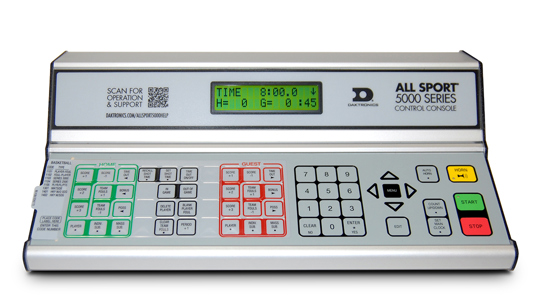
A modern electronic scoreboard is only as dependable as the control system behind it. The display might be bright and rugged, but if the operator cannot start a timer quickly, correct a scoring error, or recover from a connection drop, the experience falls apart for players, officials, and spectators. In practice, most venues compare the whole “display plus control” ecosystem when researching electronic scoreboards australia as a product category, because the controller is what turns hardware into a usable game-day tool.
The three control approaches: console, tablet, or integrated PC
Most scoreboard setups fall into one of these patterns:
A dedicated console is the classic approach. It is a purpose-built keypad with labeled buttons for horn, period, score changes, and timing. Consoles are usually straightforward to train on and tend to be reliable because they do one job well. If your venue uses volunteers who rotate often, physical buttons can reduce hesitation under pressure.
App-based control uses a tablet or phone interface. This can be convenient for multi-use venues because software profiles can switch between sports quickly. Apps can also support remote control positions, which helps when the “best view” is not near the scoreboard wiring.
An integrated PC approach is common where scoreboards tie into larger systems, such as audio, video, or venue management. This can be powerful, but it adds complexity and usually requires more structured setup and support.
How data gets to the scoreboard: wired versus wireless links
Control systems need a communications link from the operator position to the display controller. Wired connections are often the simplest path to reliability. A hardwired run is less sensitive to interference and tends to deliver consistent response time. If the operator desk is fixed and the cable path is practical, wired is usually the low-stress option.
Wireless links are popular when the operator location needs flexibility or when a venue wants minimal cabling. The trade-off is that wireless performance depends on the environment. Crowds, metal structures, nearby networks, and distance all influence stability. The best wireless setups plan for interference, use appropriate antennas, and keep the controller placement sensible.
In both cases, the key question is not “wireless or wired,” but “how predictable is it during peak use,” meaning a full venue, lots of phones, and plenty of nearby devices.
Latency, accuracy, and the feel of real-time control
A scoreboard control system should feel immediate. When the operator hits start, the clock should start, not start after a pause that makes everyone second-guess. Latency can come from weak wireless signal, overloaded networks, poorly configured devices, or software that is not optimized for quick command handling.
Accuracy matters just as much. A system that occasionally repeats a command or misses a stop input can create official disputes. Good control setups prioritize clear confirmation states, such as visible button feedback, unmistakable horn triggers, and an interface that prevents accidental double taps.
Reliability features that matter more than flashy extras
Reliability is rarely one single feature. It is a set of design choices that reduce the chance of failure and make recovery quick when something goes wrong.
Look for sensible fail-safes such as a way to enforce the correct sport mode, protection against accidental resets, and an obvious path to correct errors without digging through menus. A practical control system also supports an efficient “pause and fix” workflow, because mistakes happen, especially with volunteer operators.
Power resilience is another major factor. Surge protection, stable power supplies, and clear restart behavior can prevent a minor power event from turning into a long stoppage.
Setup and game-day habits that prevent most problems
Even a solid control system can struggle if the operating routine is messy. A few habits reduce headaches:
Place the operator where they can see both the field and the display clearly, so they can verify changes instantly. Keep controllers, tablets, and any wireless receivers charged and tested before the first whistle. If wireless is involved, do a quick pre-game connection check with a short range walk test rather than assuming last week’s settings still hold.
It also helps to standardize responsibility. Decide who runs the clock, who calls out changes, and who has authority to correct errors. When everyone knows the process, the control system feels calmer and more reliable.
Training operators for confidence across different sports
The best control interfaces still need human comfort. Training works better when it is short, repeatable, and sport-specific. Build a simple routine: start sequence, period change, timeouts, horn, and common corrections. Then run a two-minute practice scenario that includes at least one intentional mistake and recovery.
If your venue hosts multiple sports, create quick reference cards for each mode. The aim is not to memorize every feature, but to make the core tasks automatic, so the operator can focus on the flow of play rather than the buttons.