In today’s digital-first world, businesses must innovate rapidly to stay ahead. A design sprint helps teams solve complex problems, build prototypes, and test ideas with users in just a few days. However, traditional sprints face tight timelines, subjective decision-making, and labor-intensive tasks.
Enter Artificial Intelligence! AI supercharges design sprints by automating repetitive tasks, fostering creativity, and enabling data-driven decisions. From research to user testing, AI tools streamline workflows and deliver faster, more impactful results.
This article explores how AI enhances the design sprint process, providing real-world examples and practical insights into its benefits.
Understanding the Design Sprint Process
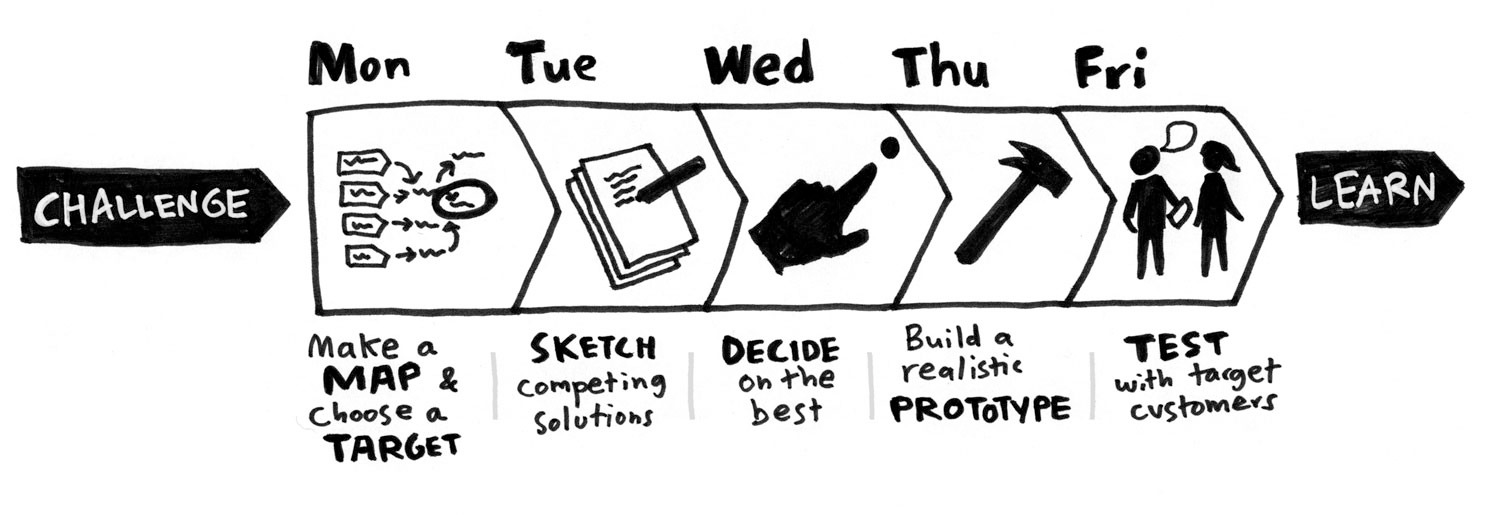
A design sprint is a structured framework that helps teams tackle complex product challenges quickly and efficiently. Originally developed at Google Ventures by former design partner Jake Knapp, this process typically unfolds over five intense days, broken down into different phases to encourage innovation and problem-solving.
The design sprint process promotes team collaboration, creativity, and efficiency, making it an invaluable tool for businesses looking to innovate quickly. Here’s how it works:
- Map – The sprint begins with a deep dive into the problem. Teams gather information, understand user needs, and define the challenge, setting clear objectives and constraints. This phase lays the groundwork for the entire sprint, ensuring everyone is aligned and focused on the right goals.
- Sketch – In this creative phase, teams brainstorm ideas to solve the problem. The goal is to be as imaginative and inclusive as possible, encouraging diverse perspectives to emerge.
- Decide – With different ideas now listed, the team narrows the options to the most promising ones, evaluating their feasibility and potential impact. This critical phase ensures that only the best solutions move forward.
- Prototype – A tangible prototype is created based on the chosen ideas, allowing teams to visualize and refine the solution. This phase is crucial for turning abstract concepts into concrete, testable realities.
- Test – Lasty, the prototype is tested with real users to gather feedback, which informs further iterations and improvements. This validation phase ensures that solutions meet user needs and are viable in the market.
By following this framework, companies can rapidly develop and validate ideas without investing excessive time and resources.
Common Challenges in Traditional Design Sprints
Despite its structured approach, traditional design sprints often encounter several challenges. This includes:
Limited time for research and ideation
Teams must condense extensive research and ideation into a short timeframe, which can lead to incomplete insights and missed opportunities. This time constraint can result in solutions formed with incomplete insights and missed opportunities.
Subjectivity in decision-making
Decisions are often based on personal biases rather than objective data, leading to solutions that don’t fully meet user needs. Without data-driven insights, teams risk creating products that fail to resonate with their target audience.
Manual effort in prototyping
Creating prototypes and gathering feedback manually is time-consuming and prone to errors. This limits the number of iterations that can be tested, potentially leading to suboptimal solutions.
Inconsistent user testing results
Small sample sizes can lead to unreliable feedback, making it challenging to validate assumptions accurately. This inconsistency can result in costly missteps if solutions are rolled out without thorough validation.
How AI is Enhancing Design Sprints
AI transforms design sprints by enhancing creativity, automating repetitive tasks, and analyzing data more efficiently than humans. Its key advantages include:
Faster idea generation and research
One of AI’s most significant impacts in design sprints is accelerating idea generation and research. AI tools can rapidly scan vast amounts of data, identify trends, and generate insights that would take humans hours or even days to compile.
This speeds up the research phase and ensures that teams have a comprehensive understanding of the problem they’re trying to solve, allowing them to explore user needs and market trends more deeply.
Unbiased and data-driven decision-making
AI also brings unbiased, data-driven decision-making to the table. By analyzing large datasets objectively, AI helps teams make decisions based on facts rather than personal biases. This ensures that solutions are grounded in user needs and market realities, reducing the risk of missteps and increasing the likelihood of success.
For instance, AI can analyze user feedback and sentiment analysis to provide a clear picture of what users truly want, helping teams prioritize features and functionalities that resonate most with their audience.
Improved prototyping
In the prototyping phase, AI-powered design suggestions transform how teams create and refine their prototypes. AI can generate design layouts, suggest improvements based on usability, and even assist in content creation, such as placeholder text and icons.
This improved prototyping process allows teams to create more effective prototypes faster, enabling them to test and refine their ideas more efficiently.
With AI, designers can focus on high-level creative decisions while AI handles the nuts and bolts of design, ensuring that prototypes are visually appealing and user-friendly.
Instant feedback analysis
AI tools can simulate user interactions, analyze feedback from large user groups, and provide actionable insights in real time. This means that teams can quickly identify and address usability issues, ensuring their solutions meet user needs and are ready for market launch.
For example, AI can analyze heatmaps and eye-tracking data to pinpoint areas of confusion or frustration, allowing teams to make targeted improvements that enhance the overall user experience.
Key AI-Powered Tools for Each Sprint Phase
AI-driven tools are revolutionizing each phase of the design sprint, empowering teams to work more efficiently and creatively. Let’s explore how AI is transforming each stage:
AI for research and insights

AI tools like ChatGPT, IBM Watson, and natural language processing (NLP)-based analytics are game-changers in the research phase. They help teams gain a deeper understanding of user needs and market trends by quickly analyzing vast amounts of data.
For instance, AI can analyze social media posts to measure user sentiment towards a product or service, providing valuable insights that inform the design process. This accelerates research and ensures that solutions are grounded in real user feedback.
AI for ideation and conceptualization
During ideation, AI tools such as Miro AI and Notion AI play a crucial role in sparking creativity. They assist in brainstorming by suggesting innovative ideas and clustering concepts to highlight promising directions.
AI can also aid in user journey mapping, helping teams visualize and enhance user experience (UX). This means that teams can generate a wide range of ideas and refine them more effectively, ensuring that all potential solutions are considered.
AI for prototyping and design
AI accelerates the design process in the prototyping phase with automated UI/UX layout generation and predictive design improvements.
Tools like Figma and Uizard integrate AI to suggest wireframes and layouts based on best practices. This allows designers to focus on high-level creative decisions while AI handles the technical aspects. As AI design capabilities continue to evolve, newer tools are emerging to further streamline this stage. A modern AI product design tool enables teams to quickly generate and iterate on product interfaces from simple prompts, reducing time-consuming manual design work. Overall, incorporating such AI-powered tools allows teams to prototype faster, iterate more effectively, and deliver better product experiences in less time.
This not only speeds up prototyping but also ensures that prototypes are both visually appealing and user-friendly.
AI for testing and validation
Finally, AI-driven usability testing platforms like Maze, Useberry, and heatmap analysis tools are transforming the validation phase. These tools can analyze user interactions to identify pain points and suggest improvements, providing actionable insights that help teams refine their solutions.
By automating user feedback collection, AI ensures that testing is efficient and effective, allowing teams to iterate quickly and deliver products that meet user needs.
The Benefits of AI in Each Design Sprint Phase
AI is revolutionizing every phase of the design sprint, from research to testing, by enhancing efficiency, creativity, and decision-making.
By leveraging AI, teams can streamline processes, reduce biases, and deliver more effective solutions. Here’s how AI transforms each phase:
1. Mapping the problem
AI simplifies the research process by automating data collection. AI-powered tools can analyze industry reports, competitor data, and customer reviews within minutes, providing a comprehensive overview of the market landscape.
Identifying trends and user needs becomes easier with NLP tools that extract insights from user feedback and social media discussions. Additionally, AI analyzes public sentiment, uncovering pain points and opportunities that inform the design process.
This rapid analysis ensures that teams deeply understand user needs and market trends from the outset.
2. Rapid ideation and concept sketching
AI accelerates brainstorming and ideation by generating multiple design concepts. AI tools suggest creative ideas based on best practices, ensuring all potential solutions are considered. AI also organizes ideas efficiently by clustering similar concepts, making it easier to identify viable solutions.
Furthermore, AI automates user journey mapping, visualizing user flows to ensure intuitive navigation and interaction. This streamlined process allows teams to explore a wide range of ideas and refine them quickly.
3. Decision-making and prioritization
AI improves decision-making by providing objective rankings. AI assigns scores to ideas based on feasibility, market demand, and impact, ensuring that decisions are data-driven rather than subjective. AI also reduces biases by analyzing user data to recommend optimal design choices.
Additionally, AI-powered predictive analytics help assess the potential success of different concepts, allowing teams to prioritize solutions with the highest potential for impact.
4. Fast prototyping and iteration
AI-driven prototyping tools enhance efficiency by automatically generating wireframes. AI-based design assistants create UI/UX layouts in seconds, saving time and resources. AI logo makers further simplify the design process by quickly generating professional logos.
AI also refines designs in real time by suggesting improvements based on usability principles, ensuring that prototypes are both visually appealing and user-friendly. Moreover, AI tools like Framer AI auto-generate code for interactive prototypes, streamlining front-end development and enabling rapid iteration.
5. Efficient testing and user feedback analysis
AI optimizes user testing by simulating real-world interactions. AI-powered heatmaps predict user behavior, providing insights into how users interact with the product. AI analyzes user feedback instantly, extracting key themes from survey responses and usability tests to inform design improvements.
Additionally, AI-driven tools enhance A/B testing by suggesting optimal variations based on user behavior, ensuring that teams can refine their solutions to maximize user engagement and satisfaction.
AI’s Role in Post-Sprint Iteration
While design sprints are typically a five-day process, the work doesn’t end once the sprint concludes. Post-sprint iteration is crucial for refining solutions based on user feedback and preparing for implementation.
AI can also significantly contribute to this phase by enabling teams to continuously improve their designs and strategies with greater precision and efficiency.
Analyzing post-sprint feedback
AI-powered tools can analyze the feedback gathered during testing to uncover deeper insights. Sentiment analysis, for instance, can identify patterns in user reactions, highlighting what worked and what didn’t.
Tools like Qualtrics or AI-based survey platforms can process large volumes of qualitative data—such as user comments—and distill actionable themes for improvement.
Predicting long-term user behavior
AI’s predictive analytics capabilities extend beyond the sprint itself. By analyzing user data from testing sessions, AI can forecast how users might interact with the final product over time.
This helps teams anticipate potential pain points or areas of friction that might arise post-launch, allowing for proactive adjustments before full-scale development begins.
Streamlining iterative prototyping
In post-sprint iterations, teams often need to refine prototypes based on feedback. AI-driven design tools can accelerate this process by automatically generating updated prototypes incorporating suggested changes.
This reduces the manual effort required to iterate and ensures that revisions are aligned with user needs.
Facilitating continuous user testing
AI enables ongoing user testing even after the sprint ends. Automated usability testing platforms like Maze or Lookback allow teams to collect real-time feedback from a broader audience, ensuring that improvements are validated continuously.
Heatmaps, click-tracking, and eye-tracking simulations powered by AI provide additional insight into how users engage with design changes.
Optimizing team collaboration
Post-sprint collaboration often involves multiple stakeholders across different functions. AI-powered project management tools like Asana or Monday.com use machine learning to allocate tasks efficiently, track progress, and suggest optimal workflows.
By streamlining communication and task management, AI ensures that post-sprint activities remain focused and productive.
Measuring success with data-driven metrics
AI can also help teams measure the success of their design sprint outcomes by tracking key performance indicators (KPIs).
For example, AI analytics platforms can monitor metrics such as user engagement rates, conversion rates, or customer satisfaction scores over time to assess whether the sprint’s solutions deliver the intended results.
Challenges in AI-Powered Design Sprints
While AI brings numerous benefits to design sprints, important challenges exist. These challenges require careful attention to ensure that AI enhances the process without introducing unintended consequences.
Avoiding AI bias in research and decision-making
One of the most critical challenges is avoiding AI bias in research and decision-making. AI models can reflect existing social or cultural biases if trained on datasets that contain these biases.
To mitigate this, it’s essential to understand AI’s limitations in interpreting human behavior and recognizing patterns. Moreover, ensuring diverse datasets is crucial to reduce bias and ensure that insights are fair and representative.
By acknowledging these limitations and using diverse data, teams can avoid biased insights that might skew their understanding of user needs.
Balancing AI automation with human creativity
Another challenge is balancing AI automation with human creativity. AI should be used to augment human creativity, not replace it. While AI can automate repetitive tasks and provide data-driven insights, it’s essential to know when to trust AI and when to rely on human judgment.
Over-reliance on AI-generated solutions can lead to a lack of innovation and missed opportunities for creative problem-solving. By maintaining this balance, teams can leverage AI’s efficiency while preserving the creative spark that drives innovation. AI strategy consulting can play a key role here, helping to effectively integrate AI while preserving the value of human input and innovation.
Ethical and privacy concerns
Finally, there are important ethical and privacy considerations. When using AI-driven user research tools, it’s vital to ensure compliance with data privacy laws such as the European Union’s General Data Protection Regulation (GDPR) and the California Consumer Privacy Act (CCPA).
Additionally, transparency in AI-assisted decision-making is crucial to maintain trust. Users must be informed about how their data is used and protected, ensuring that AI-driven processes are both ethical and transparent.
By prioritizing these considerations, teams can build trust with users and stakeholders while harnessing the power of AI to enhance their design sprints.
The Future of AI in Design Sprints
As AI continues to evolve, its role in design sprints is set to expand dramatically. Several advancements are on the horizon, promising to further revolutionize the design process.
Advancements in Generative AI
One of the most exciting developments is the rise of generative AI for real-time, adaptive prototyping. This technology will enable teams to make design iterations on the fly based on user interactions, allowing for rapid refinement and improvement.
Imagine being able to adjust prototypes in real-time as users interact with them, ensuring that solutions are perfectly tailored to meet user needs.
AI’s growing role in cross-functional collaboration
AI is also poised to play a more significant role in cross-functional collaboration. AI assistants will facilitate brainstorming sessions, ensuring that all team members, especially those working remotely, have an equal voice.
This will foster a more inclusive and collaborative environment where diverse perspectives can be harnessed to drive innovation.
The potential for fully automated sprints
While AI can handle many aspects of design sprints, from research to testing, the question remains whether fully automated sprints are feasible. While AI can streamline processes and enhance efficiency, human creativity remains essential.
The risk of relying solely on AI-generated solutions is that they might lack the innovative spark that only human imagination can provide.
Thus, the future of AI in design sprints will likely involve a balance between automation and human ingenuity, ensuring that efficiency and creativity coexist to drive groundbreaking solutions.
Embracing AI in Design Sprints
AI is transforming design sprints by revolutionizing every phase of the process. From streamlining research to accelerating ideation, AI helps improve decision-making and enhance prototyping and user testing.
However, viewing AI as a collaborator, not a replacement for human creativity is crucial. By balancing AI’s efficiency with human ingenuity, design teams can work faster, make informed decisions, and create better user experiences.
As AI technology evolves, its role in design sprints will only grow, enabling more efficient, innovative, and user-centric product development. By embracing AI responsibly, teams can harness its potential to drive creativity and efficiency while maintaining ethical standards.
This thoughtful integration of AI ensures that design sprints remain a powerful tool for innovation, delivering technologically advanced and deeply human solutions.